Generate professional document in a prompt
Describe what you want—a CV, cover letter, report, or paper—and get a professional LaTeX draft. Refine in the editor, compile to PDF. Built for students, professionals, and researchers.
Any document
CVs, letters, reports, papers
AI-guided
describe once, get a draft
Pro quality
LaTeX templates & PDF
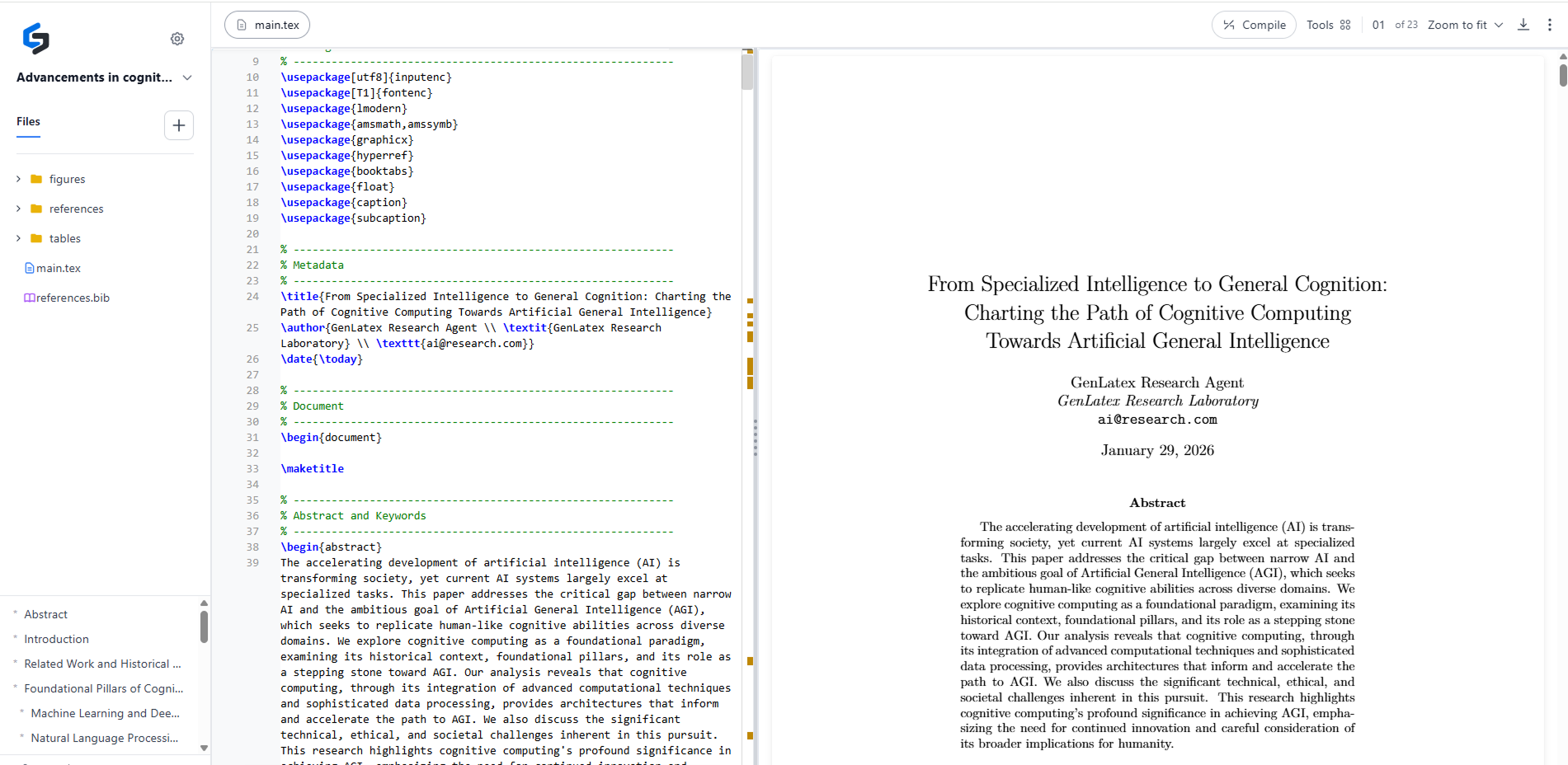
See it in action
From description to PDF in minutes
For students, professionals, and researchers




Solution
Everything You Need to Create LaTeX Documents with AI
Describe your document, upload resources, get a draft, then refine and compile to PDF—all in one place.
Describe What You Want
Start a new project and describe your document—e.g. “CV for software engineer”, “cover letter for job X”, “quarterly report”. The AI uses this to guide the rest of the flow.
LaTeX Editor & PDF Preview
Edit your LaTeX in a full-featured editor with live PDF preview. One-click compile (pdflatex/xelatex) and download. Same quality as Overleaf-style workflows.
AI Draft Generation
On the chat page, the AI asks clarifying questions and can use uploaded resources (PDFs, data, notes). It then generates a LaTeX draft tailored to your description.
In-Editor AI Chat
Fix LaTeX errors or tweak wording without leaving the editor. Ask the AI for corrections and apply them in one click so you stay in flow.
Upload Resources
Add PDFs, spreadsheets, or notes to your project. The AI uses them to fill content, add references, or match your style—great for CVs, reports, and papers.
Templates for Every Document Type
Beautiful, production-ready templates for articles, reports, CVs, letters, Beamer slides, and more—so your output looks professional by default.
Workflow
From idea to PDF in three steps
Describe Your Document
Click New Project and describe what you want—e.g. “CV for data scientist”, “cover letter for marketing role”, or “quarterly report for investors”.
Chat & Upload (Optional)
On the chat page, the AI may ask about audience, style, or length. Upload PDFs, data, or notes so the AI can use them in the draft.
Edit & Compile to PDF
Open the generated LaTeX in the editor, tweak with in-editor AI chat if needed, then compile to PDF and download.
Pricing
Simple, transparent plans
Choose the plan that matches how often you create documents.
Free
Ideal for trying GenLaTeX with no commitment.
- Up to 3 projects
- 180 MB total storage
- 1 document from scratch per week
- 3 editor AI chat messages per day
- LaTeX editor & PDF compile
- PDF export
- Community support
Pro
Best for regular users who create many documents.
- Unlimited projects
- 10 GB total storage
- Unlimited documents from scratch
- Unlimited editor AI chat
- Upload PDFs & data for context
- All document types (CV, letter, report, paper)
- LaTeX export & PDF compile
- Priority support
FAQ
Frequently asked questions
Everything you need to know about GenLaTeX / Ellora
GenLaTeX
Ready to create your next document?
Describe what you want—CV, letter, report, or paper—and get a professional LaTeX draft in minutes.
No credit card required • 3 free projects to start